Optimize PHP settings
You need to optimize some PHP settings in order to be able to upload larger size files, have more connections at the same time, etc. , including:
- Increase execution time
- PHP param max_execution_time is 30 seconds by default. Recommended value for phpFox site is 60 seconds
- Increase Max Upload Size
- The Max Upload Size is limited by 2 PHP params: post_max_size and upload_max_filesize. The default PHP values are 2 MB for upload_max_filesize, and 8 MB for post_max_size. You should increase 2 these params to appropriate values, specially if your phpFox site supports video upload.
In general, these PHP settings can be configured on server. If you are NOT familiar with server management, we strongly recommend you to reach out to hosting provider or technicians for assistances to configure PHP settings.
In this tutorial, I will guide you to how to update on both Nginx and Apache server.
Nginx server
Changes in php.ini
On CentOS: php.ini is saved in: /etc/php.ini
On Ubuntu: php.ini is saved in: /etc/php/8.1/fpm/php.ini (which 8.1 is php version that installed in your server)
bashtrue
(Increase php execution time to 3000 seconds, max upload size to 20M)
Changes in Nginx Config
On file nginx config for your site, add this line fastcgi_read_timeout 3000; like this:
bashtrue
(Increase request time out to 3000 seconds). Just add this line fastcgi_read_timeout 3000; keep default other configurations. You can preference this tutorial for more detail
By Default, the path of nginx config is saved in /etc/nginx/nginx.conf (CentOS) or /etc/nginx/sites-available/default (Ubuntu)
Reload NginX and PHP
Run these commands:
bashtrue
Check your result
Check on phpinfo
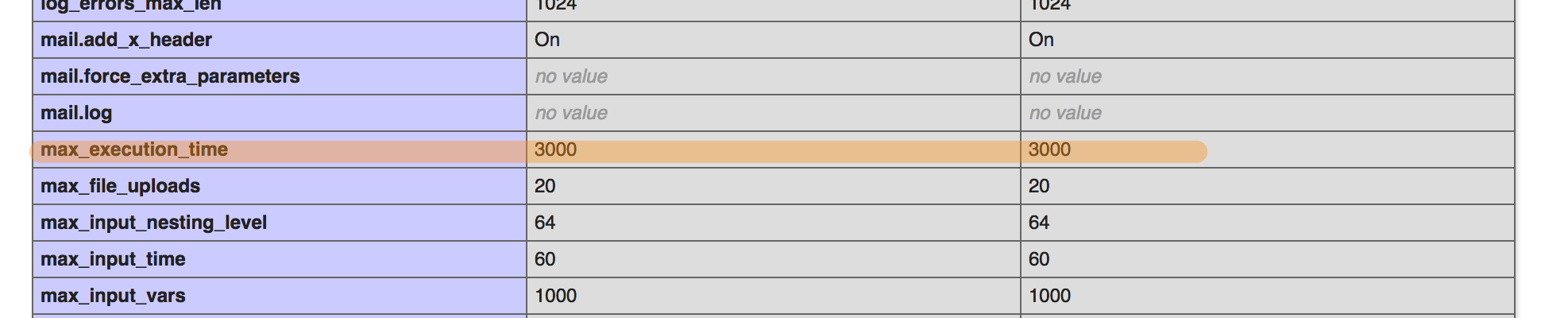
Apache Server
Changes in php.ini
On CentOS: php.ini is saved in: /etc/php.ini
On Ubuntu: php.ini is saved in: /etc/php/8.1/apache2/php.ini (which 8.1 is php version that installed in your server)
bashtrue
(Increase php execution time to 3000 seconds, max upload size to 20M)
Reload apache
Run these commands:
bashtrue