document
GitHubGitHub
  • Introduction
  • Account and License
    • Purchase license
    • Obtaining MetaFox License Key
    • Upgrade license
  • Getting Started
    • System Requirements
    • Download MetaFox Source
    • Install MetaFox
      • Prepare for Installation on LAMP server
      • Prepare for Installation with docker
    • Update MetaFox
    • Essential steps after installing MetaFox
  • Set Up Community
    • Configure General and Site Settings
      • Configure Site info
      • Set up SMTP Mail settings
      • Set up policy terms and other static pages
      • Set up Google API Key
      • Setup Contact Us form
      • Insert external Scripts into header and body
      • Set up Firebase
    • Manage Apps
      • Purchase apps
      • Install and Uninstall apps
    • Configure App Settings
      • Configure Chat with Pusher
      • Set up SMS with Twilio
      • Set up Video Sharing with URL
      • Set up video upload functionality
    • Set up Languages
      • Create a new language
      • Edit language phrase in AdminCP
      • Export phrases into CSV file
      • Import phrases from CSV file
    • Configure Appearances, Layout and Themes
      • Configure site logo favicon and site assets
      • Enable Live Editor mode
      • Rebuild web frontend
      • Add Google Adsense Block
    • Set Up ChatPlus Solution
      • ChatPlus Server Requirements
      • Set up ChatGPT Bot
      • Set up ChatPlus server
      • Set up reverse proxy with NginX
      • Update ChatPlus server
    • Set Up Live Streaming Solution
      • Live Streaming - How to go live with OBS Software
      • Live Streaming - Infrastructure Requirements
      • Live Streaming - Set up Mux
      • Live Streaming - Set up transcoder server for live videos with webcam
    • Set up Advertise
      • Create Advertise placements
      • Grant user permission to create ads
    • Set up Social Connect
      • Set up Facebook Login
      • Set up Login with Google
      • Set up Login with Tiktok
    • Set up payment gateways
      • Set up Apple Pay
      • Set up Google Pay
      • Set up NOWPayments gateway
      • Set up payment processor
      • Set up payment with E-Wallet
      • Set up Paypal gateway
    • Set up Storage
      • Configure max file size by type
      • Set up different storage system for user files
      • Set up Storage with Amazon S3
    • Configure User Settings
      • Add and edit Custom Fields
    • Set up Subscription
      • Create Subscription packages
      • Enable Subscription on Registration
      • Manage and Order Profile Menu Items
      • Set up staff emails for Contact Us form
  • Manage Community
    • Manage users
      • Create user roles
      • Configure Role Permissions
      • Assign users to certain roles
    • View site statistics
  • Build Mobile Apps
    • Use multi-site MetaFox Mobile apps
    • Premium Mobile Build Process
    • Accounts and mobile assets to build mobile apps
    • Build Android app with Mobile source code
    • Build iOS app with Mobile source code
    • Set up Sign in with Apple on iOS app
  • Software Migration
    • Migrate data from phpFox V4
  • Advanced setups
    • Block IP Addresses with htaccess file
    • Change domain
    • Configure Cache
      • Clear cache
    • Generate Sitemap XML for SEO
    • Install PHP pcntl extension on Ubuntu
    • Optimize PHP settings
    • Set up Google reCaptcha
    • Set up webserver with NginX
  • Release Notes
    • MetaFox 5.0.1
    • MetaFox 5.0.2
    • MetaFox 5.0.3
    • MetaFox 5.1.0
    • MetaFox 5.1.1
    • MetaFox 5.1.2
    • MetaFox 5.1.3
    • MetaFox 5.1.4
    • MetaFox 5.1.5
    • MetaFox 5.1.6
    • MetaFox 5.1.7
    • MetaFox 5.1.8
    • MetaFox 5.1.9
    • MetaFox 5.1.10
    • MetaFox 5.1.11
    • MetaFox 5.1.12
    • MetaFox 5.1.13
    • MetaFox 5.1.14
    • MetaFox 5.1.15
    • MetaFox 5.1.16
    • MetaFox 5.1.17
    • MetaFox 5.1.18
    • MetaFox 5.1.19
    • MetaFox 5.2.0
    • MetaFox 5.2.1
    • MetaFox 5.2.2
Question? Give us feedback →
Advanced setupsConfigure CacheClear cache

Clear cache

This article will guide to how to clear cache on MetaFox site

Log into AdminCP of your site. Click on the Broom icon on the top header bar.
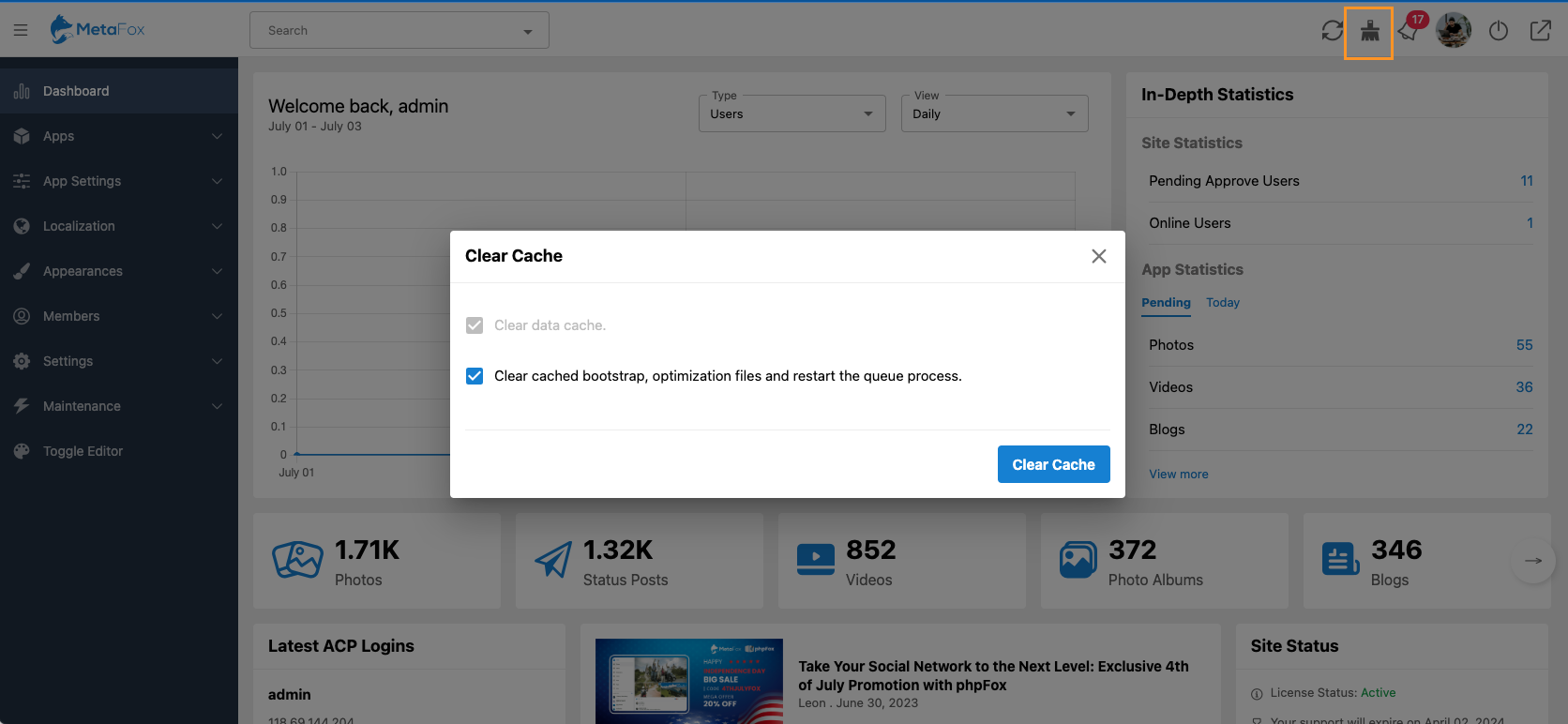
Screenshot 2023-07-03 at 10.19.15.png

Click on the Clear Cache button.

Done! All caches have been removed properly then.

Configure CacheGenerate Sitemap XML for SEO

Copyright 2026 ©  phpFox Corp. All rights reserved.